Add a one-click offer at checkout. Earn more from every order.
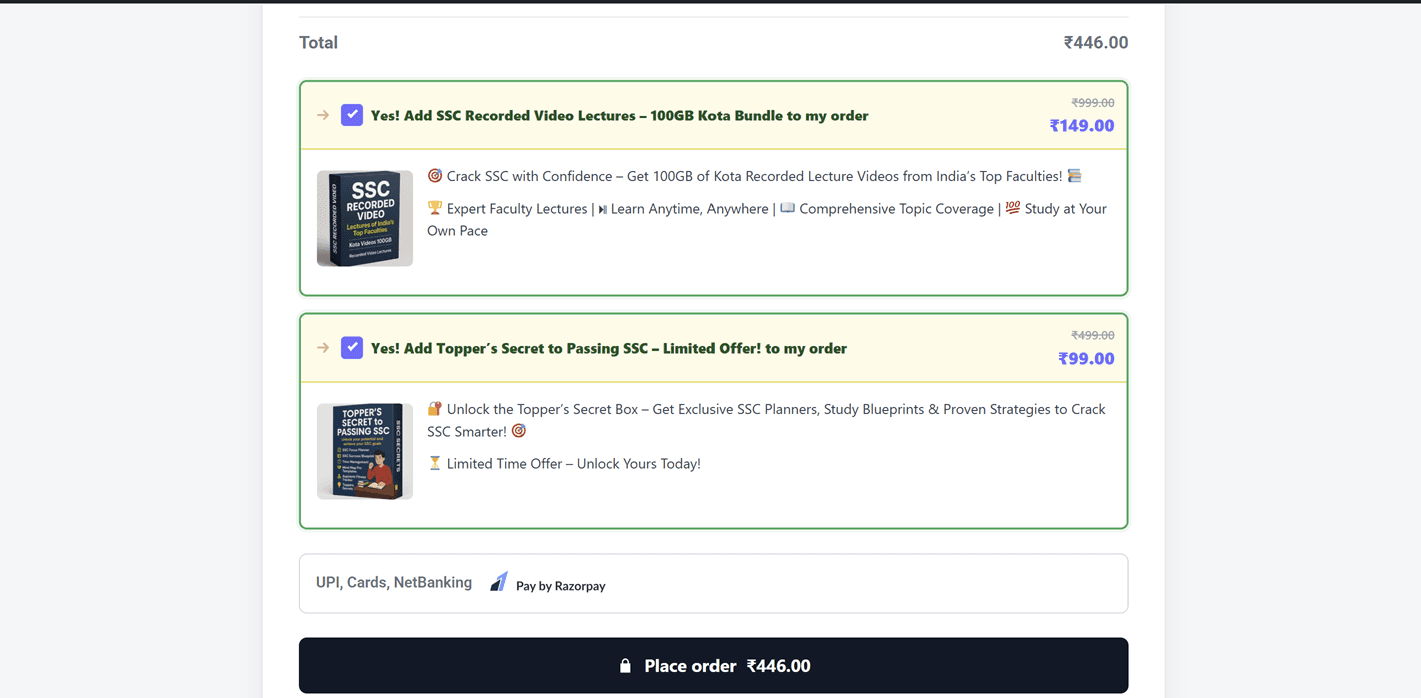
Naxolabs Order Bump shows a small, relevant offer right before the customer pays. One tick adds it to the order, with no page reload and no extra step.
Works with classic and block checkout. Refunds within 14 days on Pro.
Try it: tick the offer and watch the total. Sample order.
The easiest sale is the one already happening
The customer has decided to buy. A small, relevant offer at that moment feels helpful, not pushy.
More revenue from the same traffic
Customers who are already buying see one relevant extra. You earn more without paying for another visitor.
No friction at checkout
One tick adds the offer, and one untick removes it. The page never reloads and the customer stays on track.
Built for your checkout
Works with classic and block checkout, loads only on the pages that need it, and sends no data to outside services.
Live on your checkout in three steps
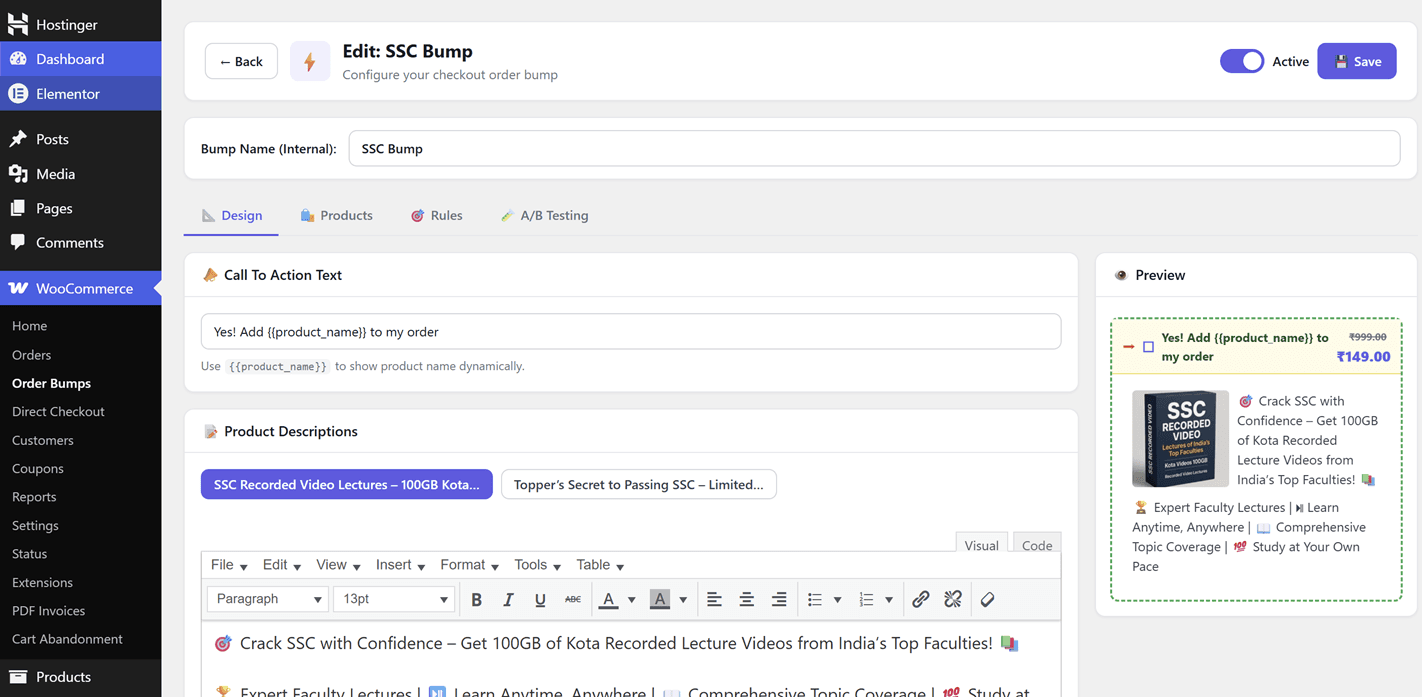
No code and no theme changes. Everything happens in your WordPress admin.
Pick your offer
Choose a product, or a single variation, and set a percentage or flat discount.
Design it live
Choose a skin, write the headline and colours, and check it in the live preview.
Show it to the right people
Target by products or categories in the cart, or by a minimum order total.
Pro gives you the tools to grow
Each module switches on or off, so your store loads only what you use.
Unlimited bumps and products
Remove the free limit of 2 bumps and 2 products per bump.
A/B testing
Test a second headline, badge, discount or image and see the winner at 95% confidence.
Analytics
Impressions, clicks, conversions and net revenue, with date ranges, charts and CSV export.
Checkout Design
Restyle your checkout: layouts, fields, trust badges, guarantees, reviews and up to 3 more designs for chosen products.
Advanced display rules
Target by user role, order history, cart subtotal or billing country.
Scheduling
Run a bump between dates, on chosen days and at chosen hours.
BOGO offers
Add the same product free, another product free, or a product at a percentage off.
More places
Show bumps on the cart page, product pages and in the mini-cart, not only at checkout.
GA4 and Meta Pixel events
Send bump views, adds and removals through the tags already on your store.
Import and export
Back up your bumps or move them to another store with a .json file.
Premium skin
An extra bump design with its own colours.
Free and Pro compared
Start free and upgrade only when you need more.
| Feature | Free | Pro |
|---|---|---|
| Order bumps | 2 | Unlimited |
| Products per bump | 2 | Unlimited |
| Classic and block checkout | Included | Included |
| Percentage and flat discounts | Included | Included |
| Cart, category and minimum order rules | Included | Included |
| Live admin preview | Included | Included |
| Revenue tracking | Included | Included |
| Design skins | 2 | 3 |
| A/B testing | Not included | Included |
| Full analytics and CSV export | Not included | Included |
| Checkout Design | Not included | Included |
| Role, history and country rules | Not included | Included |
| Scheduling | Not included | Included |
| BOGO offers | Not included | Included |
| Cart, product page and mini-cart bumps | Not included | Included |
| GA4 and Meta Pixel events | Not included | Included |
| Import and export | Not included | Included |
Simple pricing, one plugin
Every plan includes every Pro module, with updates and support. The free plugin stays free, and Pro needs it installed.
Starter
For a single store
- 1 site
- Every Pro module
- Updates and support
- 14-day refund
Growth
For several stores
- 5 sites
- Every Pro module
- Updates and support
- 14-day refund
Agency
For agencies and client work
- 50 sites
- Every Pro module
- Updates and support
- 14-day refund
Questions
Does Pro work without the free plugin?
No. Pro adds modules to the free plugin, so Naxolabs Order Bump (Free) must be installed and active.
Does it work with block checkout?
Yes. All modules, including Checkout Design, work with both the classic and the block checkout.
What happens when a yearly license expires?
Everything you set up keeps working on your store, but updates and support stop. Seven days later, Pro work can't be changed until you renew. Reports and exports stay open.
What is the refund policy?
You can ask for a refund within 14 days of buying. If a license is refunded, the Pro features turn off and your bumps keep working with the free plugin's features.
Will Checkout Design change my checkout right away?
No. It is off by default, and it starts in Preview, where only store managers see it, until you set it to Live.
Do you collect my customers' data?
No. Your customers' and orders' data is never sent. License checks and updates connect to Freemius with the license key, site address and version numbers only.
Do local development sites count towards my limit?
No. Local sites such as localhost do not count towards your site limit.
Start with the free plugin today
Set up your first order bump in minutes. Move to Pro when you want more bumps, testing and checkout control.